
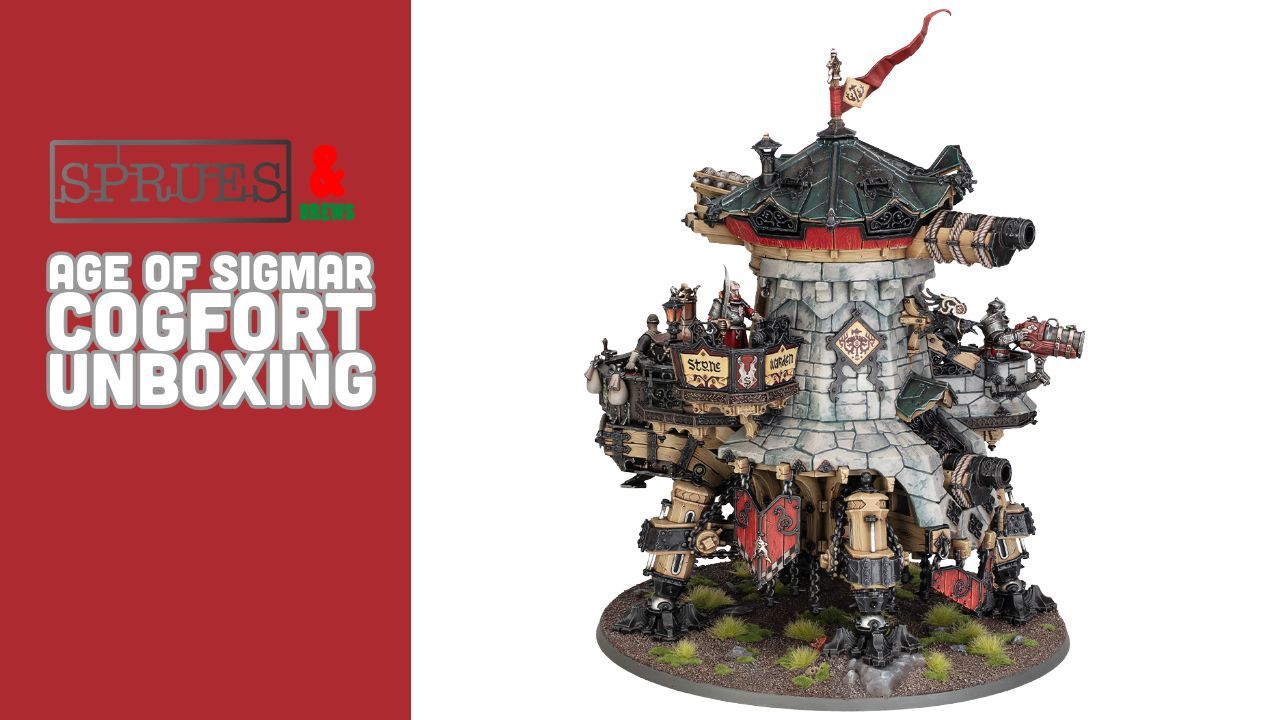
It’s no surprise that the mighty Cogfort is the centrepiece of an impressive Cities of Sigmar release wave. The closest thing we have to an Imperial Knight in AOS, and a massive model that can be taken in any Age of Sigmar army – this is one I was super excited to get my hands on and paint up!
In this full review we’ll be checking out the Cogfort, talking about how the build process was and giving some tips about painting it up to use in your games! We’ll also be taking a look at just how big it is compared to some other kits in the range!
Massive thanks to Games Workshop for sending us over a Cogfort to check out on the site! If you would like to support the site then why not pick up yours through our affiliate Element Games and save yourself some money too?
We have a load of Cities of Sigmar content up on the site today including a full review of the new Battletome here and a look at all the other kits in this wave which you can see here.
We’ve also got unboxing and showcase videos of all these which you can see just below or over on YouTube!
So without further ado let’s check out this awesome kit!
Cogfort Review


We’ve heard about Cogforts in the lore for a long time, but it’s very exciting that we finally have them on the tabletop too! Unsurprisingly this is a big kit! Clocking in at £125 this is one of the most expensive kits in the range, and it has a whole host of sprues, some of which are duplicated in order to build up the core of the structure.


This symmetrical structure to the main body is actually quite interesting, as it allows the various balconies and platforms can be placed anywhere around the outer wall – which means if you have multiple Cogforts in your army you can have them all looking different.
In addition to this, the four legs can also be placed in any combination, with some being different heights meaning you can have it leaning to the left or right as it’s advancing too!


There’s some really nice hidden details in the kit too – The turret opens up and has interior detail, but can also optionally be built with a member of crew holding up the window to take a look out! All of these windows are fully movable and can be posed however you like, which is a really cool touch!
You also get a really nice transfer sheet with a whole host of emblems and icons on it, which really does finish off the model!
So just how big is the Cogfort?


As you can see from the above images it’s a biggie! It towers over basic infantry and even Gargants. Height wise its about as tall as a Mega Gargant, but has a lot of mass to it – it feels like a resin Spartan in weight due to the width and mass of it once together, certainly feeling chunkier than a Mega Gargant in the hand. It’s certainly not the biggest model in the range though, Archaon still wins out on being the tallest model (but again he doesn’t feel quite as heavy as it!)
Now this is a model that really needs some sub assemblies in order to make it much easier to paint. The top turret twists off, which makes life easier (and incendently, if you twist the top off it will just fit in a 9l really useful box too…) and the canopy just clicks ontop of that. I also kept all the crew members as seperate assemblies, but If I was to paint a second Cogfort I would also leave the balconies and engine seperate too. There’s a lot of detail here that is hard to get to once you have stuck it together, and it’s quite a large and heavy model to wrestle with when trying to paint it all stuck together
So how did I go about painting it?
I primed it in Mechanicus Standard Grey, which as a nice mid colour for all the tones on the model. First step was getting the stone effect down. I decided to airbrush the entire thing in Dryad bark first, as this would make a good base for both the stone and wood
From here there was a lot of drybrushing involved! I started working up the stone with Steel Legion Drab – this was put on quite heavily and I didnt worry about being too neat. Next I drybrushed all the stone with Karak Stone. With these rough and heavy drybushes down, I moved to a more controlled drybrush of Rakarath Flesh to start building up that more stone like colour.
At this point I wanted to add a bit of variation to the stone work, and so thinned some Morghast Bone and Ushabti Bone and applied them to random bricks, just to mix things up a little.
After this was dry I then worked through 2 more drybrush sessions, each more subtle than the last. First was a pass of Palid Wych Flesh, followed by a very very light drybrush of White Scar just to catch the most raised areas.
With this the stone was done. I went back in with Dryad Bark and picked out any wood panels I had accidently hit with the drybrushing.
Once that was done the next job was the other base colours. The light silver areas I painted in Leadbelcher and the dark silver areas are Iron Warriors. Red areas were painted Mephiston Red and any leather was done in Thondia brown. For the slate panels I used The Fang and the shield icons I painted in a bone colour as a base for the transfers to sit in.
Once this was all dry I hit everything apart from the stone work in a controlled layer of Agrax Earthshade – you want it to sit in the recesses but just watch out it doesnt run and ruin the stone.
After an hour this was dry and I continued to layer up the colours. I hit the raised red with Mephiston again, and then painted in the woodwork pattern with Evil Sunz to get a nice painted wood effect. The wood had a similar treatment with Dryad Bark followed by Gorthor Brown.
Metals got highlighted with Stormhost Silver to give them a nice shiny edge, while the leather got picked out with Doombull. Slate was then highlighted with Russ Grey and the shield faces tidied up. Once this was all dry the transfers were applied and the model was glued together (including the sand bags that sit on the back of the model and obscure some of the transfers)
It took me about a week to paint it, but it was well worth the effort and I’m already to paint up the other variant of it when that comes out!
The Cogfort is up for pre order today and is released Saturday 30th May
Games Workshop provided a free copy for review purposes.



Leave a Reply